
Oye Bhaiya, sach batao — last time tumne phone uthaya “sirf 2 minute ke liye” aur 45 minute baad hosh aaya? 📱
Tum akele nahi ho. 2026 mein average insaan apna phone din mein 186 baar check karta hai — matlab jagne ke har 5 minute mein ek baar. Aur inme se zyadatar checks toh reflex hote hain, bina soche-samjhe.
Good news ye hai — isko fix karne ke liye sirf willpower nahi chahiye. Sahi screen time tracker chahiye jo tumhare liye friction create kare.
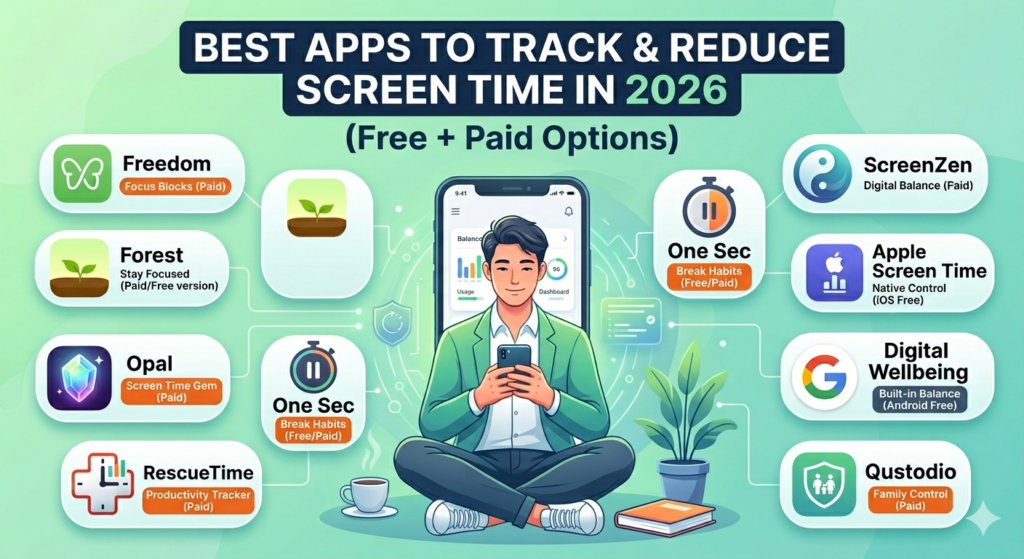
Is post mein main 2026 ke 11 best screen time tracker aur reduce-karne-waale apps share kar raha hoon — Android aur iPhone dono ke liye, aur khaas taur pe Indian students, parents aur working professionals ke liye kya best fit hai, wo bhi bataunga.
Table of Contents
Screen Time Tracker Kyun Zaroori Hai 2026 Mein
Research batati hai ki jo log screen time tracking app use karte hain, wo pehle mahine ke andar apna daily phone usage average 2.5 ghante tak kam kar dete hain — jiska seedha asar behtar neend, kam anxiety, aur sharp focus pe padta hai.
Sirf willpower rarely kaam karta hai. Ek achha screen time tracker tumhara “digital accountability partner” banta hai — awareness aur boundary dono create karta hai tumhare aur tumhare phone ke beech mein.
Chalo, ab list dekhte hain.
11 Best Screen Time Apps in 2026
1. 🏆 Freedom — Best Overall App Blocker (Sabse Strict)
Best for: Jinhe hard, strict boundaries chahiye across all devices Platform: Android, iOS, Windows, Mac, Chrome Price: Free trial | Premium ~₹280/month
Freedom sabse powerful blocker hai kyunki ye phone, laptop, aur tablet — teeno pe ek saath distracting apps/websites block karta hai. Instagram block kiya phone pe? Laptop pe bhi nahi khulega. Koi escape route nahi.
Best feature: Locked Mode — session start hone ke baad khud tum bhi stop nahi kar sakte.
Kaun use kare: Remote workers, students, aur wo log jo “dusre apps pe cheat” karte hain.
2. 🌳 Forest — Best for Visual Motivation (India Mein Sabse Popular)
Best for: Fun, gamified approach chahne waale Platform: Android aur iOS Price: One-time ~₹170
Forest Indian students ke beech sabse zyada favourite screen time app hai. Focus timer set karo, ek virtual tree grow hota hai. Beech mein Instagram/YouTube khola? Tree mar jaata hai.
Ek real case — humare hi ek reader ne bataya ki Forest use karne ke baad uska daily screen time 32% tak kam ho gaya, aur JEE prep mein focus double ho gaya.
Bonus: Forest ek real tree-planting NGO se partner hai — enough coins earn karo, wo actual tree plant karte hain tumhare naam pe.
Kaun use kare: Students, creative professionals, gamification pasand karne waale.
3. 🧠 Opal — Best for iPhone Deep Insights
Best for: iOS users jo analytics + coaching chahte hain Platform: iOS only Price: Free basic | Premium ~₹420/month
Opal sirf blocker nahi hai — ek insight engine hai. Ye batata hai tumhara trigger kya hai aur tum baar-baar phone kyun uthate ho. Iska “Deep Focus Mode” bypass karna almost impossible hai.
Kaun use kare: iPhone users jinka phone addiction strong hai aur normal limits override kar dete hain.
4. 😮💨 One Sec — Best for Doomscrolling Todne Ke Liye
Best for: Mindfulness-based reduction Platform: Android aur iOS Price: Free (limited) | Premium ~₹420/month
One Sec unique approach leta hai — app block nahi karta, balki har app khulne se pehle ek breathing exercise deta hai. Ye chhota sa pause genuine awareness build karta hai. Research batati hai ye impulsive app-opens 30-50% tak kam kar deta hai.
Kaun use kare: Log jo hard blocking nahi chahte, gradually mindful habits build karna chahte hain.
5. 📊 RescueTime — Best for Productivity Tracking
Best for: Professionals aur freelancers Platform: Android, iOS, Windows, Mac Price: Free (Lite) | Premium ~₹1,000/month
RescueTime background mein chalta hai, automatically track karta hai kitna time productive kaam mein gaya aur kitna distractions mein — bina kuch bhi manually karo.
Best feature: FocusTime — automatically distracting websites block kar deta hai work hours mein.
Kaun use kare: Freelancers, remote workers, hourly billing waale professionals.
6. 🆓 ScreenZen — Best FREE App (Zero Budget Ke Liye Perfect)
Best for: Bina paise kharch kiye powerful features chahne waale Platform: Android aur iOS Price: Completely FREE
Agar budget zero hai, ScreenZen tumhara best dost hai. Isme paid apps se bhi zyada customization milta hai — bilkul free mein. App delays, daily limits, website blocking, aur custom pause message bhi add kar sakte ho (jaise “Oye Bhaiya, phone rakh de! 😄”).
Kaun use kare: Koi bhi jo apni detox journey start kar raha hai aur pehle try karna chahta hai bina invest kiye.
7. 📱 Apple Screen Time (Built-in) — iPhone Beginners Ke Liye
Platform: iOS (built-in) Price: Free
Settings → Screen Time mein jaake turant activate karo. Turant pata chal jayega kaunsa app sabse zyada time kha raha hai.
Limitation: “Ignore Limit” button se aasani se bypass ho jaata hai — awareness ke liye great, strict control ke liye weak.
8. 🤖 Google Digital Wellbeing (Built-in) — Android Beginners Ke Liye
Platform: Android (built-in) Price: Free
Settings → Digital Wellbeing mein daily usage dekho, app timers set karo, Focus Mode enable karo. Har Android user ko yahin se start karna chahiye, kisi bhi third-party app se pehle.
9. 👨👩👧 Qustodio — Best for Parents & Families
Best for: Parents jo bacchon ka screen time manage karna chahte hain Platform: Android, iOS, Windows, Mac, Chromebook Price: ~₹2,500/year se shuru
Qustodio sabse comprehensive family solution hai — daily limits, app/website block, study-time aur bedtime schedules, aur weekly reports — sab ek parent dashboard se.
Best feature: Sab devices pe kaam karta hai — phone, tablet, laptop, Chromebook — ek hi dashboard se.
10. ⛔ AppBlock — Best Anti-Uninstall Protection
Best for: Wo log jo temptation mein app hi delete/reinstall kar dete hain Platform: Android (strongest), iOS (limited) Price: Free version available | Pro ~₹350/month
AppBlock ka main advantage hai anti-uninstall protection — jab tak tumhara set kiya hua block session khatam nahi hota, tum app ko delete karke bypass nahi kar sakte (jo Freedom jaise apps mein possible hota hai).
Kaun use kare: Wo log jinhone pehle bhi apps try ki hain aur “smart tarika” nikaal ke bypass kar liya.
11. 🌅 Habi — Best All-in-One Habit + Focus System (Naya 2026 Entrant)
Best for: Apple ecosystem users jo habits + screen time ek jagah track karna chahte hain Platform: iPhone, iPad, Mac (Apple Silicon), Vision Pro Price: Free core features, optional Pro upgrade
Habi 2026 mein trending hai kyunki ye sirf screen time block nahi karta — habits, focus timers, aur daily goals ko ek system mein jodta hai. Heaviest blocker nahi hai, lekin agar tumhe ek app chahiye jo screen time ko tumhare bigger goals se connect kare, ye try karne layak hai.
Quick Comparison Table
| App | Best For | Platform | Price |
|---|---|---|---|
| Freedom | Strict multi-device blocking | All | Paid (~₹280/mo) |
| Forest | Gamified focus | Android + iOS | One-time (~₹170) |
| Opal | Deep iPhone insights | iOS only | Freemium |
| One Sec | Mindful habit building | Android + iOS | Freemium |
| RescueTime | Productivity analytics | All | Freemium |
| ScreenZen | Best free option | Android + iOS | Free |
| Apple Screen Time | iPhone beginners | iOS | Free |
| Digital Wellbeing | Android beginners | Android | Free |
| Qustodio | Parental controls | All | Paid (~₹2,500/yr) |
| AppBlock | Anti-uninstall protection | Android | Freemium |
| Habi | Habits + focus system | Apple only | Freemium |
Best Screen Time Apps for Indian Students (JEE/NEET Special)
Agar tum board exams ya JEE/NEET prep kar rahe ho, priority thodi different honi chahiye — tumhe kuch nahi chahiye jo tumhare study apps (jaise PW, NTA Abhyas) ko bhi block kar de.
Best Screen Time Tracker
- Forest — sabse zyada Indian students isi ko use karte hain; study session ke dauraan tree grow hota hai
- ScreenZen (Free) — zero budget students ke liye perfect, Instagram/YouTube pe delay laga do, study apps free rehne do
- AppBlock — agar phele bhi apps uninstall karke bypass kar chuke ho, iska anti-uninstall lock kaam aayega
Exam season ke liye detailed strategy chahiye toh hamara Digital Detox for Board Exams guide zaroor padho — wahan hour-by-hour study-phone balance plan diya hai.
Best FREE Screen Time Apps (Zero Budget)
Agar paisa kharch nahi karna, in teeno se shuru karo:
- ScreenZen — sabse customizable free app
- Apple Screen Time / Google Digital Wellbeing — already tumhare phone mein hai, sirf ON karna hai
- Forest — one-time ₹170 (chahe toh isse bhi skip kar sakte ho aur sirf built-in tracker se start kar sakte ho)
Which App Should YOU Download?
- “Main apni limits pe cheat kar leta hoon” → Opal (iPhone) ya Freedom (all devices)
- “Free mein start karna hai” → ScreenZen ya apna built-in tracker
- “Main student hoon, focus chahiye” → Forest try karo
- “Pehle apni habits samajhna chahta hoon” → RescueTime
- “Main parent hoon” → Qustodio
- “Hard blocking nahi, mindfulness chahiye” → One Sec
- “Pehle bhi apps delete karke bypass kiya hai” → AppBlock
Agar bacchon ke YouTube/social media use ko lekar chinta hai, hamara child YouTube addiction warning signs post bhi zaroor dekho.
FAQs
Q1. Sabse achha FREE screen time tracker kaunsa hai 2026 mein? ScreenZen sabse zyada features deta hai bina kuch charge kiye — app delays, daily limits, website blocking sab free mein. Agar bilkul zero setup chahiye, tumhare phone ka built-in Apple Screen Time ya Google Digital Wellbeing bhi kaafi hai.
Q2. Screen time tracker app permissions ke bina bhi kaam karta hai kya? Zyadatar hard-blocking apps (Freedom, AppBlock) ko accessibility ya device admin permissions chahiye hoti hain taaki tum bypass na kar sako. Agar tumhe privacy concern hai, built-in trackers (Apple Screen Time, Digital Wellbeing) sabse kam permission maangte hain kyunki wo phone ke OS ka hi part hain.
Q3. Indian students ke liye kaunsa app best hai? Forest sabse popular hai India mein — gamified aur affordable (one-time ~₹170). JEE/NEET students ke liye ScreenZen bhi accha option hai kyunki study apps ko exclude karke sirf distracting apps block kar sakte ho.
Q4. Kya screen time app sach mein phone addiction kam karta hai? Haan, lekin sirf app install karne se kaam nahi chalega — consistency zaroori hai. Research batati hai first month mein hi average 2.5 ghante ka reduction dikhta hai, agar tum app ki settings ko regularly use karo.
Q5. Parents ke liye best free option kya hai? Google Family Link (Android) aur Apple Screen Time (iOS) dono free hain aur basic parental controls dete hain. Agar zyada detailed reports aur multi-device support chahiye, Qustodio best paid option hai.
Final Thoughts
Best screen time tracker wahi hai jise tum consistently use karoge.
Meri salah — pehle ek hafta apna built-in tracker (Apple Screen Time ya Digital Wellbeing) se sirf observe karo, kuch change mat karo. Numbers dekh ke shock lagega. Uske baad apni personality ke hisaab se is list se ek app pick karo, aur judge karne se pehle kam se kam 2 hafte do.
Yaad rakho — apps sirf tools hain, magic solution nahi. Real change tab aata hai jab tum decide karte ho ki apne time aur attention ke saath intentional rehna hai.
Ye padhke tumne pehla step already le liya hai. Yahi sabse important hai. 💪
Agar tumhe apna screen addiction level pehle check karna hai, hamara Phone Addiction Test zaroor try karo — 2 minute mein pata chal jayega. Aur agar office mein screen fatigue feel hoti hai, Digital Detox for Working Professionals guide bhi padho How to Do a 24-Hour Digital Detox Challenge